
Live at app.milestoneer.nl
Every project is the same shape. Only the numbers differ.
Write down once how a job runs at your firm: phases, milestones, dependencies, with formulas in them instead of fixed dates. After that you start a project by filling in the numbers, and Milestoneer works out the schedule — across working days, public holidays and dependency lags. Change one number and everything hanging behind it moves with it.
You do not create an account here — we do that, once you have asked. Tell us what kind of jobs you run, we set your organization up, and after that you sign in at app.milestoneer.nl. The 60-day trial starts the moment we open your organization, not the moment you mail us.
- Project scheduling for installation companies, drawing offices and contractors
- Dutch and English
- Three worked examples to choose from the first time you sign in
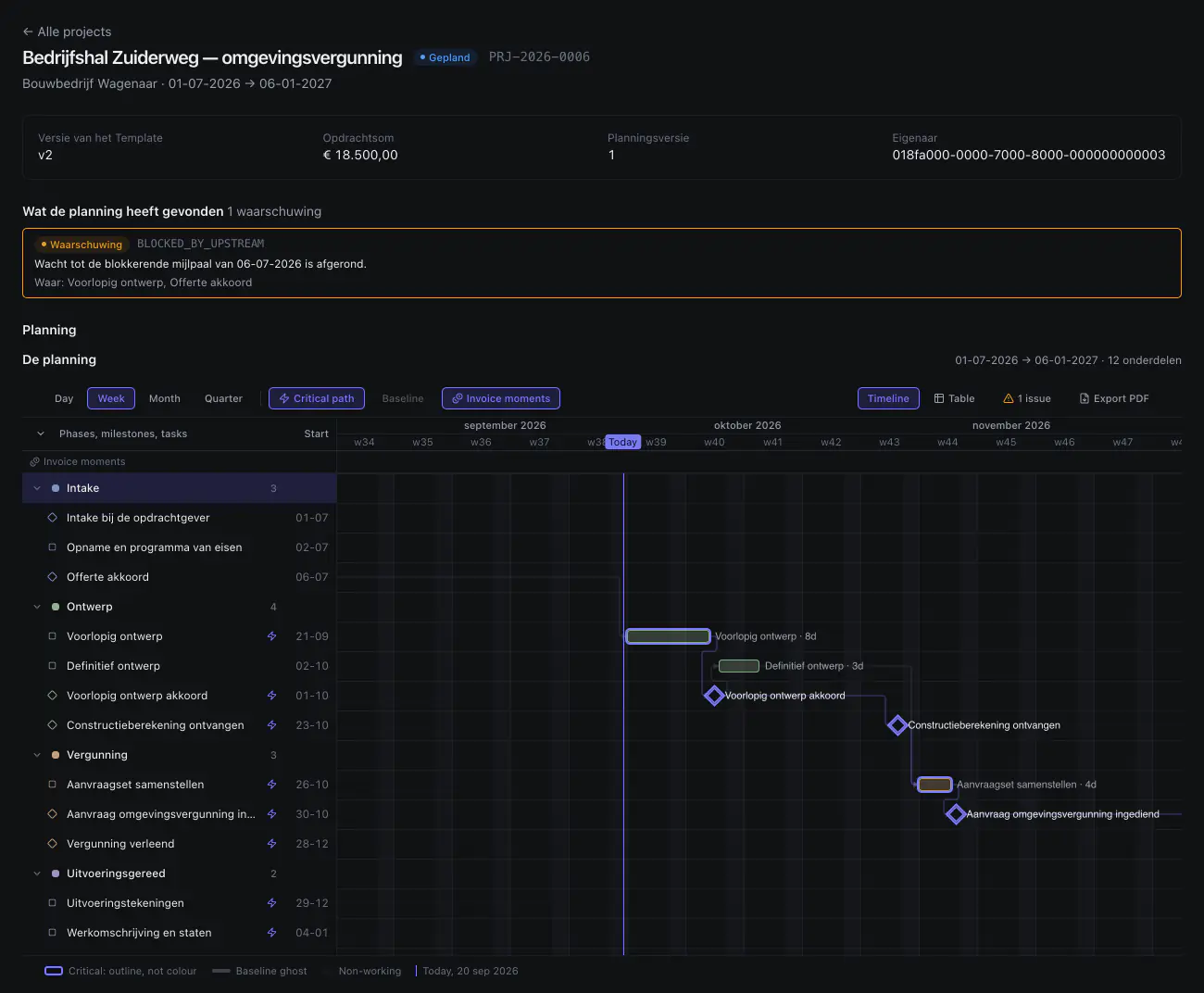
beslistermijn_weken at 8, a start date and
three other numbers. Nobody typed a date here: the bars, the milestones,
the arrows between them and the critical path all follow from those. The
warning at the top comes out of the same computation.
The core of it
Change one number, and the dates move with it
A drawing office is waiting on the municipality. In most schedules that
decision period is a date somebody keeps up by hand, with another eight
or so dates quietly hanging off it. In Milestoneer it is a variable in
the template — beslistermijn_weken, the decision period in
weeks — used as the lag on the dependency between “permit
application submitted” and “permit granted”. Move it from 8
to 14 and everything behind it shifts six weeks.
Worked example: the municipality’s decision period as a variable
Template variable
beslistermijn_weken
weeks In this example the decision period is set to fourteen weeks.
- Permit granted
- at 8 weeks
- 1 Apr 2026
- at 14 weeks
- 13 May 2026
Six weeks later: thirty working days. Everything hanging behind it moves too.
The same thing in words, in case you cannot see the animation: the
application goes out on 4 February 2026. With a decision period of 8
weeks the permit is in on 1 April and the construction drawings follow
shortly after. Set beslistermijn_weken to 14 and the permit
arrives on 13 May — six weeks, or 30 working days, later. The drawings,
the specification and everything hanging off those move with it. Nobody
touched a date to make that happen. The dashed bars show where the plan
stood before.
What works today
This is in there now, and it is running today
No demo environment: the list below is what runs on app.milestoneer.nl, and the moment you are in it is your own organization with your own templates in it. Getting in goes through us rather than through a signup form. Anything not on the list does not work — that list is here too, further down.
01Templates with formulas
Phases, milestones, tasks and dependencies, with variables in them: number of units, review rounds, lead time. Every expression is worked out live against sample values as you type.
02Versions that freeze
A published version is read-only. Editing it makes version N+1, so projects already running do not change under your hands. You can see which version a project is on.
03Projects from a template
Fill in the numbers, pick a start date, and there is a plan with real dates on it. The same job again is a form, not last year’s copy that you have to check line by line.
04A Gantt you can drag
Drag a bar and the schedule is computed again. If somebody else is working on the same plan at the same time, Milestoneer reports the conflict instead of quietly keeping whichever answer arrived last.
05Milestones with a state
Complete, approve, skip and reopen, each with a checklist of deliverables under it. A milestone is done when its checklist is done, not when somebody ticked a box somewhere else.
06Clients and contacts
Clients, the people you deal with there, and an activity history per client and per project, so you can go back and see who changed what, and when.
07A calendar that is right
The schedule counts in working days, knows the public holidays and understands lags on dependencies — two days after handover, not two days after handover except at weekends.
08An onboarding wizard with three worked examples
Solar installation, design and permit application, house renovation. You pick one and it is built in your own organization as an ordinary template — not demo data, just yours, and yours to change.
09Scheduling across all projects
One view of everything running: every project as a bar with its milestones
on it, and beside it, per person, the hours booked per day against their
capacity. A day that goes over names the number —
12 / 8 — instead of only turning red. You can drag
here, and it goes through exactly the same path as inside the project
itself.
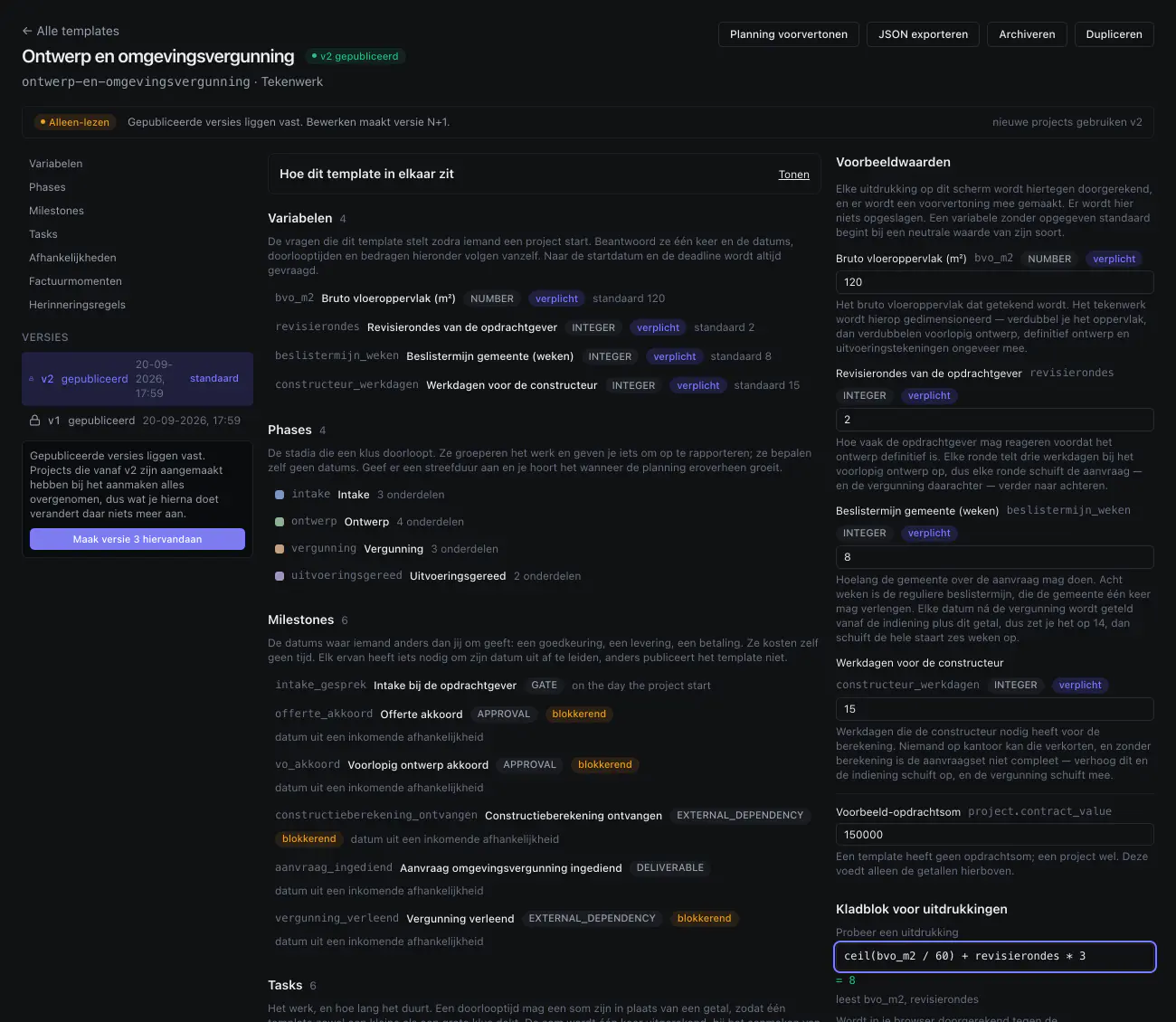
ceil(bvo_m2 / 60) + revisierondes * 3 comes
out at 8 working days for 120 m² and two review rounds. Those are the
same eight days as the bar “Voorlopig ontwerp · 8d”
in the schedule above. A published version is frozen; editing one creates
version N+1.
About the two screenshots on this page: they were taken out of the running application on 20 September 2026, in the product’s dark theme, not from a design and not rebuilt for the picture. What you see is the working area: the navigation column and the top bar fall outside the frame. Three things on them are not yet where they should be. The interface is set to Dutch, but the product’s fixed words — Phases, Milestones, Tasks, “Alle projects”, Export PDF, “on the day the project start” and the whole bar above the schedule — are still in English. The template carries “Factuurmomenten” and “Herinneringsregels” — invoice moments and reminder rules: you can write both down and the schedule works out their dates, but today no invoice and no reminder goes out. And the dark theme itself is younger than the rest: until this week the schedule painted its columns white however dark the page around it was. That is fixed, but the fix is not on app.milestoneer.nl yet. What else is missing is listed below.
And then the people
Three projects, one Thursday
A schedule that only looks at dates is right per project and wrong added up. Two running jobs already fill Sanne’s Thursday completely. The third project does not know that — it looks at its own plan, and that plan is fine on its own. On the board across every project the three are added together, and the day that goes over names the number instead of only turning red.
Worked example: three projects on one person’s week
Thursday, Sanne Bakker
8 hours per day
hours booked In this example Thursday carries twelve hours of work on an eight-hour day.
- Thursday
- with two projects
- 8 / 8
- with three projects
- 12 / 8
Four hours too many, on a day that was already full. You see it now, not on Thursday.
The same thing in words, in case you cannot see the animation: Sanne
works eight hours a day. Renovatie Kerkstraat and Zonnepanelen Meijer
between them already take up eight hours on Thursday. Bedrijfshal
Zuiderweg puts four more on top, and Thursday is twelve hours on an
eight-hour day — which the board shows as 12 / 8. The
dashed lines mark where the week stood with two projects. Nobody filled
anything in for this: the hours come out of the three schedules as they
were already running.
Who it is for
Firms that do the same kind of job over and over
Not for anyone who invents every project from scratch. For anyone who thinks, the third time round: I typed all of this in last month as well.
Installation companies
240 units or 40 units, otherwise the same job
In the worked example the mounting work is
ceil(number_of_units / 40) working days. At 240 units that is
six days, at 40 units it is one. You change a number, not a schedule.
Drawing offices
Waiting on other people, planned as waiting
beslistermijn_weken, revisierondes,
constructeur_werkdagen: the municipality’s decision period, the
number of review rounds and the structural engineer’s lead time. All
three visible in the plan instead of in somebody’s head.
Contractors
Crews waiting on each other
Strip-out, shell, fit-out, handover, with the quality assurer’s statement as an external milestone and the weather buffer as a lag on the dependency — not as slack hidden inside a task.
What is not there yet
This is on the list. Today it does not work.
We put it here because you would find out within ten minutes anyway. Far better that you know what is missing before you start than that you discover it at the moment you need it. Two things on this list are finished but not on app.milestoneer.nl yet, and they say so themselves. Built is not the same as usable, and until it is there it counts as missing here.
Absence and holidays done, not released yet
Days off and leave that actually move the schedule, showing you the consequences before you commit them. Built and tested; not on app.milestoneer.nl yet.
My week done, not released yet
A personal view of what is expected of you, and by when — made to be used on a phone. Built and tested; not on app.milestoneer.nl yet.
Notifications not yet
A message when a milestone is coming up or something is slipping, instead of you going to look.
Invoice moments and invoices not yet
You can already write payment moments into a template and the schedule works out their dates; it is the invoice itself that does not go out yet.
Time tracking against the budget not yet
Hours written up next to hours estimated, per task and per project.
Client portal not yet
A place where your client sees the schedule and signs things off.
A link to your accounting package not yet
Invoices that find their way into your bookkeeping without being retyped.
Exporting projects and organizations not yet
A template version can already be exported as JSON; a whole project, or your whole organization, cannot.
Want a say in what comes first?
Leave your address. You hear from us when something comes off this list, and now and then we ask which one you would want next. Not a newsletter.
That is the mailing list. If you want to try it now, getting in touch is the faster route.
How you get in
Want to try this? This is the way in.
There is no signup form: we set your organization up by hand. Write us two lines about the kind of jobs you run, and we will show you what that looks like as a template, walk through it with you, and then you can take it from there yourself. No sales pitch.
If we say yes, you can get going straight away: you sign in at app.milestoneer.nl, pick one of the three worked examples and put your own projects in it. Only at that moment do the 60 days of the trial start — not when you send the mail. If you wait three days for an answer, those three days cost you nothing.
This is a different thing from the mailing list below: here you talk to the people building it and you get in, there you only hear when something is done.
Ask for access
Get in touchThe mail comes prefilled with the four things we want to know: your name, your company, your email address, and one line about the kind of work you do. A phone number is welcome, but not required.
Or mail us directly at hello@milestoneer.nl
Once you are in
Your first template is up the same afternoon
The first time you sign in you pick one of the three worked examples. It is built in your own organization as an ordinary template: throw out whatever does not work that way at your firm and make it your own shape. After that every next project is a one-minute form.
For people who already have an account. Not yet? Then the button above is the way.
Or just keep an eye on it