
Live op app.milestoneer.nl
Elk project is dezelfde vorm. Alleen de getallen verschillen.
Leg één keer vast hoe een klus bij jullie loopt: fases, mijlpalen, afhankelijkheden, met formules erin in plaats van vaste datums. Daarna maak je een project door de getallen in te vullen, en rekent Milestoneer de planning uit — over werkdagen, feestdagen en marges heen. Verandert er één getal, dan schuift alles wat erachter hangt vanzelf mee.
Je maakt hier geen account aan — dat doen wij, nadat je het gevraagd hebt. Vertel wat voor klussen jullie doen, dan zetten we je omgeving klaar en log je daarna in op app.milestoneer.nl. De proefperiode van 60 dagen begint op het moment dat we je omgeving openzetten, niet op het moment dat je ons mailt.
- Projectplanning voor installatiebedrijven, tekenbureaus en aannemers
- Nederlands en Engels
- Drie uitgewerkte voorbeelden om uit te kiezen bij de eerste keer inloggen
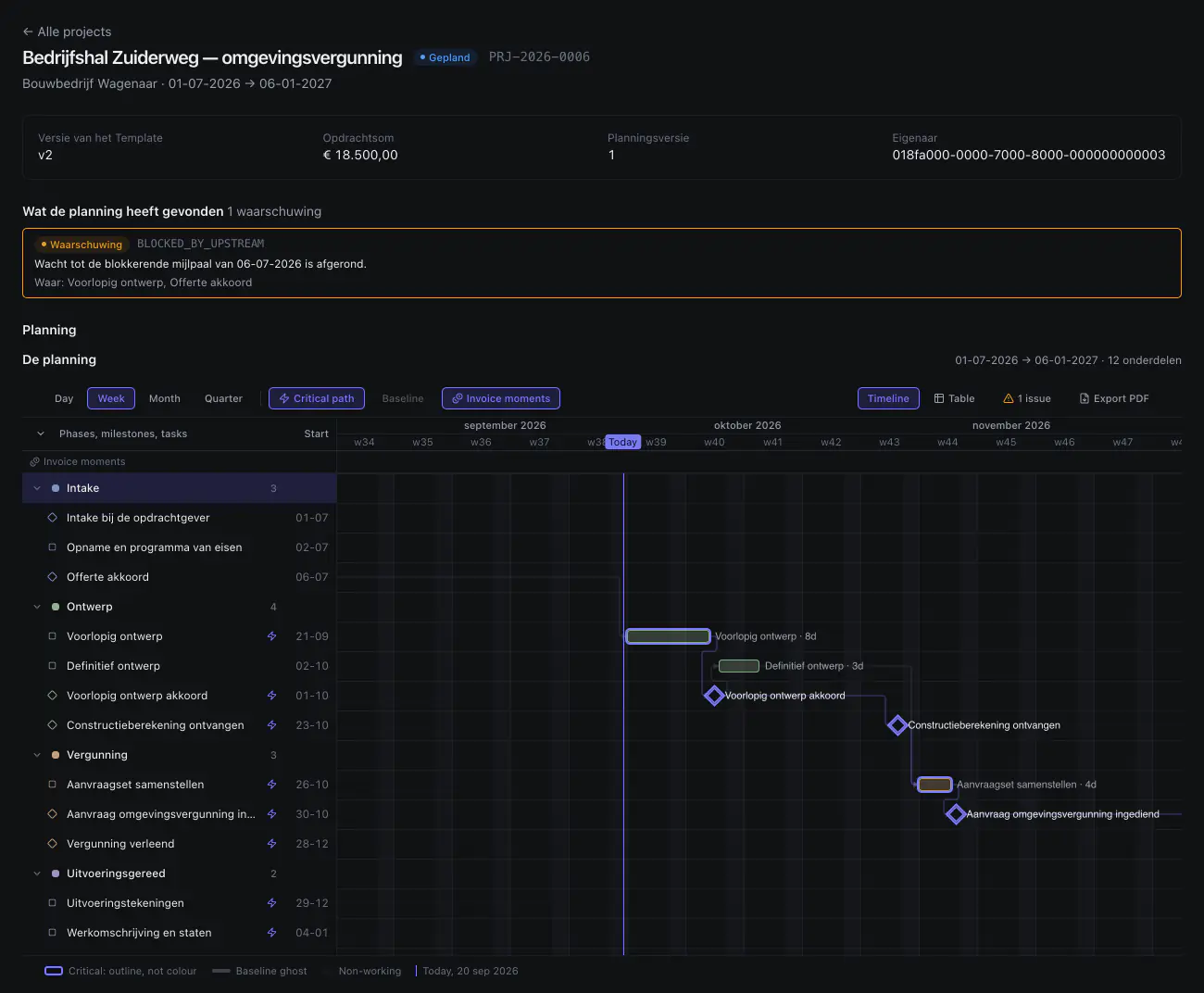
beslistermijn_weken op 8, een
startdatum en drie andere getallen. Niemand heeft hier een datum
ingetypt: de balken, de mijlpalen, de pijlen ertussen en het kritieke pad
volgen daaruit. De waarschuwing bovenin komt uit dezelfde berekening.
De kern
Verander één getal, en de datums schuiven mee
Een tekenbureau wacht op de gemeente. In de meeste planningen staat die
beslistermijn als een datum die iemand met de hand bijwerkt, en daaronder
nog een stuk of acht datums die daar stilletjes van afhangen. In
Milestoneer is het beslistermijn_weken: een variabele in het
sjabloon, die als marge op de afhankelijkheid tussen «aanvraag
ingediend» en «vergunning verleend» hangt. Zet hem van 8
op 14 en alles erachter schuift zes weken op.
Voorbeeld: de beslistermijn van de gemeente als variabele
Sjabloonvariabele
beslistermijn_weken
weken De beslistermijn staat in dit voorbeeld op veertien weken.
- Vergunning verleend
- bij 8 weken
- 1 apr 2026
- bij 14 weken
- 13 mei 2026
Zes weken later, dertig werkdagen. Alles wat erachter hangt schuift mee.
Hetzelfde in woorden, voor als je de animatie niet ziet: de aanvraag
gaat op 4 februari 2026 de deur uit. Bij een beslistermijn van 8 weken is
de vergunning er op 1 april en liggen de uitvoeringstekeningen er kort
daarna. Zet beslistermijn_weken op 14 en de vergunning komt op
13 mei — zes weken, oftewel 30 werkdagen, later. De tekeningen, de
werkomschrijving en alles wat daar weer aan hangt schuiven mee. Niemand
heeft daarvoor een datum aangeraakt. De gestreepte balken laten zien waar
het plan stond.
Wat er vandaag werkt
Dit staat er nu in, en het draait vandaag
Geen demo-omgeving: onderstaande lijst is wat er draait op app.milestoneer.nl, en zodra je binnen bent is het jouw omgeving met jouw sjablonen erin. Binnenkomen gaat via ons, niet via een aanmeldformulier. Wat er niet in de lijst staat, werkt niet — die lijst staat er ook, verderop.
01Sjablonen met formules
Fases, mijlpalen, taken en afhankelijkheden, met variabelen erin: aantal eenheden, aantal beoordelingsrondes, levertijd. Elke uitdrukking wordt live doorgerekend tegen voorbeeldwaarden terwijl je typt.
02Versies die bevriezen
Een gepubliceerde versie is read-only. Wijzigen maakt versie N+1, zodat projecten die al lopen niet onder je handen veranderen. Je ziet welke versie een project gebruikt.
03Projecten uit een sjabloon
Vul de getallen in, kies een startdatum, en er staat een plan met echte datums. Dezelfde klus opnieuw is een formulier, geen kopie van vorig jaar waarin je alles moet nalopen.
04Een Gantt die je kunt slepen
Versleep een balk en de planning rekent opnieuw. Werkt iemand anders tegelijk aan hetzelfde plan, dan merkt Milestoneer het conflict op in plaats van stilletjes het laatste antwoord te bewaren.
05Mijlpalen met een status
Afronden, goedkeuren, overslaan en heropenen, elk met een opleverchecklist eronder. Een mijlpaal is af als de checklist af is, niet als iemand een vinkje ergens anders heeft gezet.
06Klanten en contactpersonen
Opdrachtgevers, contactpersonen en een activiteitenhistorie per klant en per project, zodat je terug kunt zien wie wat wanneer heeft veranderd.
07Een agenda die klopt
De planning rekent in werkdagen, kent de feestdagen en begrijpt marges op afhankelijkheden — twee dagen na oplevering, niet twee dagen na oplevering behalve in het weekend.
08Een startwizard met drie voorbeelden
Zonnepaneelinstallatie, ontwerp en omgevingsvergunning, woningrenovatie. Je kiest er één en die wordt in jouw omgeving gebouwd als een gewoon sjabloon — niet als demodata, gewoon van jou en van jou om aan te passen.
09Planning over alle projecten heen
Eén beeld van alles wat loopt: elk project als een balk met zijn
mijlpalen erop, en ernaast per persoon de ingeplande uren per dag naast
hun capaciteit. Een dag die eroverheen gaat noemt het getal —
12 / 8 — in plaats van alleen rood te kleuren. Je kunt
er slepen, en dat gaat langs precies dezelfde weg als in het project
zelf.
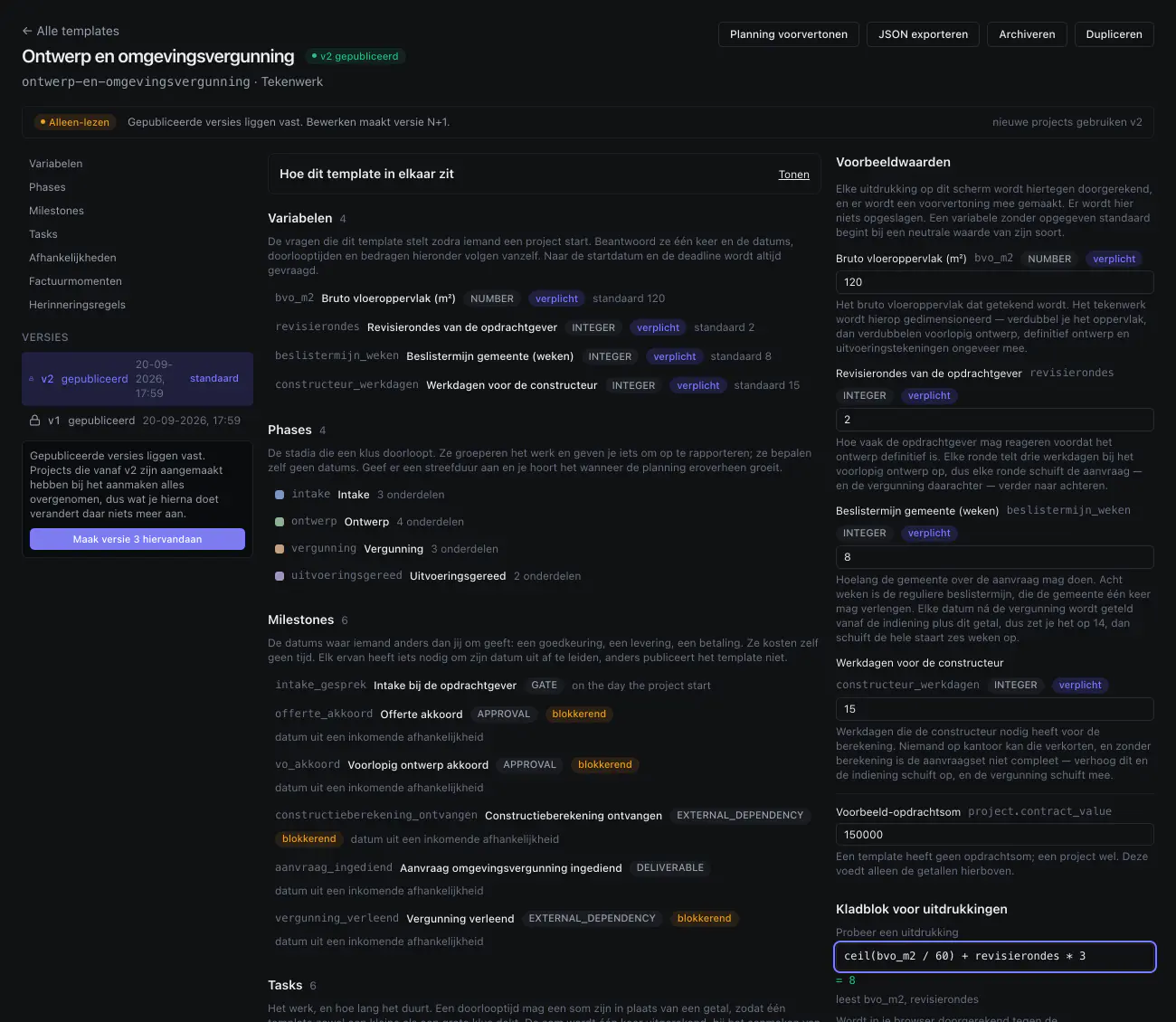
ceil(bvo_m2 / 60) + revisierondes * 3 bij 120
m² en twee revisierondes op 8 werkdagen uitkomt. Dat zijn dezelfde acht
dagen als de balk «Voorlopig ontwerp · 8d» in de
planning hierboven. Een gepubliceerde versie ligt vast; bewerken maakt
versie N+1.
Over de twee schermafbeeldingen op deze pagina: ze zijn op 20 september 2026 uit de draaiende applicatie gehaald, in het donkere thema van het product, niet uit een ontwerp en niet nagebouwd. Je ziet het werkvlak: de navigatiekolom en de bovenbalk vallen buiten de uitsnede. Drie dingen erop zijn nog niet waar ze horen te zijn. De interface staat op Nederlands, maar de vaste woorden van het product — Phases, Milestones, Tasks, «Alle projects», Export PDF, «on the day the project start» en de hele balk boven de planning — staan er nog in het Engels. In het sjabloon staan «Factuurmomenten» en «Herinneringsregels»: die kun je allebei opschrijven en de planning rekent hun datums uit, maar er gaat vandaag geen factuur en geen herinnering de deur uit. En het donkere thema zelf is jonger dan de rest: tot deze week tekende de planning haar kolommen wit, ook als je het donkere thema aan had. Dat is gerepareerd, maar die reparatie staat nog niet op app.milestoneer.nl. Wat er verder nog niet is, staat hieronder.
En dan de mensen
Drie projecten, één donderdag
Een planning die alleen naar datums kijkt, klopt per project en niet bij elkaar. Twee lopende klussen vullen de donderdag van Sanne al helemaal. Het derde project weet dat niet — dat kijkt naar zijn eigen plan, en dat plan is op zichzelf in orde. Op het bord over alle projecten heen staan de drie bij elkaar opgeteld, en de dag die eroverheen gaat noemt het getal in plaats van alleen rood te kleuren.
Voorbeeld: drie projecten op de week van één persoon
Donderdag, Sanne Bakker
8 uur per dag
uur ingepland Op donderdag staat er in dit voorbeeld twaalf uur werk op een dag van acht uur.
- Donderdag
- bij twee projecten
- 8 / 8
- bij drie projecten
- 12 / 8
Vier uur te veel, op een dag die al vol stond. Je ziet het nu, niet op donderdag.
Hetzelfde in woorden, voor als je de animatie niet ziet: Sanne werkt
acht uur per dag. Renovatie Kerkstraat en Zonnepanelen Meijer staan samen
al op acht uur op donderdag. Bedrijfshal Zuiderweg legt er vier uur
bovenop, en dan staat er twaalf uur op een dag van acht — wat het bord
als 12 / 8 laat zien. De gestreepte lijnen laten zien waar de
week stond met twee projecten. Niemand heeft daar iets voor ingevuld: de
uren komen uit de drie planningen zoals ze al liepen.
Voor wie
Bedrijven die dezelfde soort klus steeds opnieuw doen
Niet voor wie elk project vanaf nul verzint. Wel voor wie na de derde keer denkt: dit heb ik vorige maand ook al ingetypt.
Installatiebedrijven
240 stuks of 40 stuks, verder dezelfde klus
In het voorbeeldsjabloon staat de montage als
ceil(number_of_units / 40) werkdagen. Bij 240 stuks is dat
zes dagen, bij 40 stuks één. Je wijzigt een getal, niet een planning.
Tekenbureaus
Wachten op derden, ingepland als wachten
beslistermijn_weken, revisierondes,
constructeur_werkdagen: de beslistermijn van de gemeente, het
aantal revisierondes en de doorlooptijd van de constructeur. Alle drie
zichtbaar in het plan in plaats van in iemands hoofd.
Aannemers
Ploegen die op elkaar wachten
Sloop, ruwbouw, afbouw, oplevering, met de verklaring van de kwaliteitsborger als externe mijlpaal en het weersrisico als marge op de afhankelijkheid — niet als stiekeme lucht in een taak.
Wat er nog niet is
Dit staat op de lijst. Vandaag werkt het niet.
We zetten het hier neer omdat je er binnen tien minuten achter zou komen. Liever dat je weet wat er ontbreekt voordat je begint, dan dat je het ontdekt als je het nodig hebt. Twee dingen op deze lijst zijn inmiddels af maar staan nog niet op app.milestoneer.nl; die zeggen het er zelf bij. Gebouwd is niet hetzelfde als bruikbaar, en tot het er staat telt het hier als ontbrekend.
Afwezigheid en vakanties af, nog niet uitgerold
Vrije dagen en verlof die de planning daadwerkelijk verschuiven, met de gevolgen in beeld voordat je ze vastlegt. Gebouwd en getest; staat nog niet op app.milestoneer.nl.
Mijn week af, nog niet uitgerold
Een persoonlijk beeld van wat er van jou verwacht wordt, en wanneer — gemaakt om op een telefoon te gebruiken. Gebouwd en getest; staat nog niet op app.milestoneer.nl.
Meldingen nog niet
Een bericht als een mijlpaal nadert of iets blijft liggen, in plaats van zelf kijken.
Factuurmomenten en facturen nog niet
Je kunt betaalmomenten nu al in een sjabloon opschrijven en de planning rekent hun datums uit; er gaat alleen nog geen factuur de deur uit.
Urenregistratie tegen de begroting nog niet
Geschreven uren naast de geraamde uren, per taak en per project.
Klantportaal nog niet
Een plek waar je opdrachtgever de planning ziet en goedkeuringen geeft.
Koppeling met de boekhouding nog niet
Facturen die hun weg naar je boekhoudpakket vinden zonder overtypen.
Projecten en omgeving exporteren nog niet
Een sjabloonversie kun je nu al als JSON exporteren; een heel project of je hele omgeving nog niet.
Wil je meebepalen wat er als eerste komt?
Laat je adres achter. Je hoort van ons als er iets van deze lijst af is, en we vragen af en toe wat jij het eerst zou willen. Geen nieuwsbrief.
Dit is de mailinglijst. Wil je het nu al proberen, dan is contact opnemen de snellere weg.
Zo kom je binnen
Wil je dit proberen? Dit is de weg naar binnen.
Er is geen aanmeldformulier: we zetten je omgeving met de hand klaar. Schrijf in twee regels wat voor klussen jullie doen, dan laten we zien hoe dat er als sjabloon uitziet, lopen we het samen door, en kun je het daarna zelf verder invullen. Geen verkooppraatje.
Zeggen we ja, dan kun je meteen aan de slag: je logt in op app.milestoneer.nl, kiest een van de drie uitgewerkte voorbeelden en zet je eigen projecten erin. Pas op dat moment gaat de proefperiode van 60 dagen lopen — niet als je de mail stuurt. Wacht je drie dagen op antwoord, dan kosten die je niets.
Dit is iets anders dan de mailinglijst hieronder: hier praat je met de mensen die het bouwen en kun je erin, daar hoor je alleen als er iets af is.
Toegang aanvragen
Neem contact opDe mail staat al voor je klaar met de vier dingen die we willen weten: je naam, je bedrijf, je e-mailadres en in één regel wat voor werk jullie doen. Een telefoonnummer erbij mag, maar hoeft niet.
Of mail rechtstreeks naar hello@milestoneer.nl
Zodra je binnen bent
Je eerste sjabloon staat er dezelfde middag
Bij de eerste keer inloggen kies je een van de drie uitgewerkte voorbeelden. Die wordt in jouw omgeving gebouwd als een gewoon sjabloon: gooi eruit wat bij jou niet zo gaat en maak er je eigen vorm van. Daarna is elk volgend project een formulier van een minuut.
Voor wie al een account heeft. Nog niet? Dan is de knop hierboven de weg.
Of blijf op de hoogte